Phase 1 Research & Discovery
Understanding a shared cockpit ecosystem
Before designing screens, I mapped how two displays, one audio pipeline, and multiple vehicle states had to coexist.
The Challenge
Business & User Goals
Business Goals
- Create a premium connected cockpit experience
- Differentiate Sierra through passenger-focused features
- Reduce driver distraction
- Deliver production-ready UX within a tight timeline
- Ensure seamless integration with Android-based vehicle software
User Goals
- Enjoy entertainment independently
- Control media without asking the driver
- Experience premium audio features
- Relax during long journeys
- Receive clear, predictable system feedback
Design Thinking Process
Research Approach
- · User interviews
- · Stakeholder workshops
- · Competitive benchmarking
- · HMI analysis
- · Engineering reviews
- · Requirements review
- · Design iterations
Competitive Research

Mercedes EQS
AI personalization, camera-based driver distraction blocking, widget shortcuts

Porsche Taycan
Cockpit mirroring, passenger seatbelt gating, customizable My Screen

Jeep Grand Wagoneer
Simplicity-first passenger entertainment and clear ownership

Li Xiang L9
Multi-screen cabin entertainment density and family-oriented media
Competitive Analysis
| Vehicle | Features in PID | Anything unique | Ratings | ||
|---|---|---|---|---|---|
| Simplicity | Usability | Intuitiveness | |||
Mercedes EQS |
|
| 3/5 | 4/5 | 4/5 |
Porsche Taycan |
|
| 4/5 | 4/5 | 3/5 |
JEEP Jeep Grand Wagoneer |
|
| 5/5 | 4/5 | 4/5 |
Li Xiang L9 |
|
| 1/5 | 2/5 | 1/5 |

Mercedes EQS
- Navigation
- Phone
- Radio
- Media
- Apps
- Comfort
- Settings
- Information
- Search
- EQ
- Share Content
- Shortcuts
- Climate Control
- Air Quality
- Voice Control
- Connect Headphones
- Car Loudspeakers
- Uses AI to display personalized suggestions and adapt completely to the user’s needs.
- Camera-based blocking logic so that the driver does not get distracted.
- Profiles
- Widget Shortcuts
- Simplicity
- 3/5
- Usability
- 4/5
- Intuitiveness
- 4/5
Porsche Taycan
- Navigation
- Phone
- Cockpit
- Media
- Devices
- Sports Chrono
- Weather
- Instructions
- Information
- Search
- Widgets
- Custom Layout
- Share Content
- Settings
- Cockpit option to view the IC
- Customization of My Screen
- Only work while driving when somebody is in the passenger seat with their seat belts on.
- Simplicity
- 4/5
- Usability
- 4/5
- Intuitiveness
- 3/5
- JEEP
Jeep Grand Wagoneer
- Audio
- Video
- HDMI
- U Connect
- Navigation
- Devices
- Cameras
- Notifications
- Control Rear Screens
- Search
- Apps
- Climate
- USB
- Share Content
- Controls
- Settings
- Can play content through HDMI, USB and Other sources.
- UConnect — Rear seat Entertainment control.
- FireStick and Fire TV.
- View Vehicle Camera Apps.
- Simplicity
- 5/5
- Usability
- 4/5
- Intuitiveness
- 4/5
Li Xiang L9
- Devices
- Nap Mode
- Pre-Installed Apps
- iQIYI
- Bilibili
- iff
- Quanmin
- Quanmin
- Ximalaya
- QQ Music
- Migu Videos
- Entertainment heavy screen.
- Personalized content suggestion.
- Nap mode.
- Preinstalled Apps.
- Simplicity
- 1/5
- Usability
- 2/5
- Intuitiveness
- 1/5
Jeep Grand Wagoneer leads in simplicity, while Mercedes EQS excels in intelligent personalization. There is a clear opportunity to combine personalization, safety, and entertainment control in a balanced way.
Create a system that offers intelligent personalization and passenger entertainment control while maintaining driver focus and simplicity.
Key Research Insights
Drivers prioritize safety
Reduce cognitive load and interruptions
Passengers want independent entertainment
Provide dedicated passenger controls
Audio ownership creates confusion
Design clear concurrency rules
Long journeys increase fatigue
Create Relax Mode experiences
Premium buyers expect immersion
Elevate cabin experience through JBL & Dolby
Users dislike excessive popups
Prefer intelligent automatic resolution where possible
“The hardest part of this project was not designing a passenger screen — it was designing how the entire cockpit should behave when two people interact with one shared audio ecosystem at the same time.”
Phase 2 Define
Defining the Problem Space
Understanding the Ecosystem
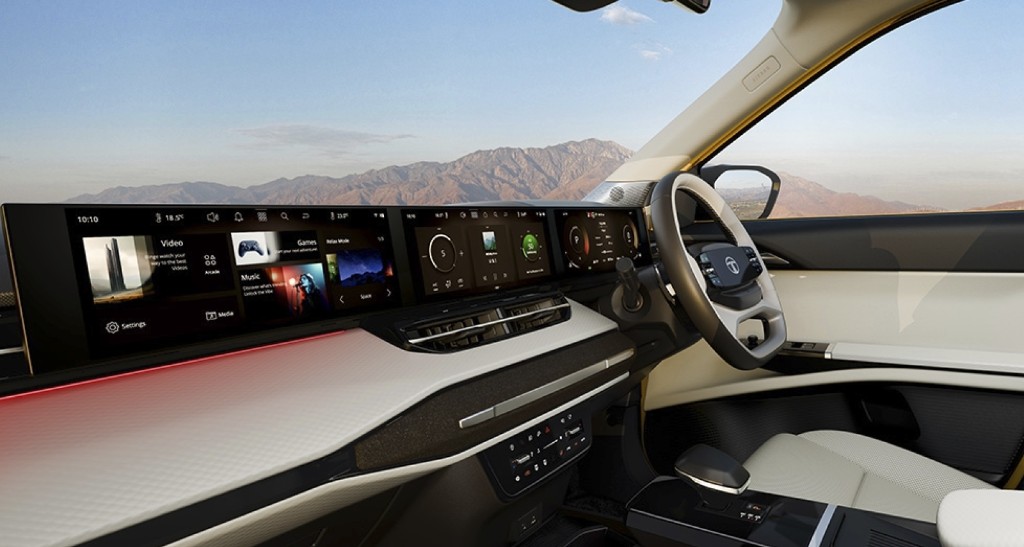
Unlike traditional infotainment systems, Tata Sierra introduces a dual-display cockpit where both the driver and passenger can actively interact with the vehicle's digital ecosystem.
Rather than functioning as two independent screens, both displays operate as a connected system that shares hardware resources, vehicle states, and a common audio pipeline.
This introduced an entirely new UX challenge:
“How do two users interact independently while sharing a single system without creating confusion or compromising safety?”
The Connected Cockpit Ecosystem
Although users perceived two separate displays, the system behaved as one connected experience.
Every interaction on one display had the potential to influence the other.
Understanding the Stakeholders
Multiple stakeholders whose needs often conflicted.
Problem Statement
Tata Motors needed a premium digital cockpit that differentiated Sierra — the passenger display unlocked richer entertainment and harder interaction challenges.
Drivers wanted focus. Passengers wanted freedom. Both expected one system to just work — with a single shared audio output.
Safety rules, vehicle states, shared audio hardware, Android limits, latency, and real-time sync shaped every design decision.
Design Objectives
Six guiding objectives established for the project.
Driver First
Every interaction prioritizes driver safety over entertainment — navigation prompts, phone calls, media interruptions, and Relax Mode restrictions.
Passenger Independence
Passengers enjoy entertainment without depending on the driver.
- Media browsing
- Video playback
- Relax Mode
- JBL Modes & Dolby Atmos
- Audio settings
Intelligent Conflict Resolution
The system resolves conflicts automatically instead of asking users through popups.
- Media ownership transfer
- Audio interruptions
- Source switching
- Call prioritization
System Transparency
Whenever the system changes behaviour automatically, users understand why — e.g., 'Relax Mode exited because the vehicle is in motion.'
Consistency
Both displays always reflect the current system state.
- Current media
- Active source
- Playback state
- Audio ownership
Premium Experience
Every interaction reinforces the Sierra's premium identity through motion, transitions, and emotional experiences like Relax Mode.
Design Principles
Safety before Convenience
Entertainment should never compromise driver awareness.
One System, Two Displays
Users experience one connected ecosystem, not two screens.
Minimize Cognitive Load
The system makes intelligent decisions instead of forcing manual conflict resolution.
Predictability Builds Trust
Users always understand why the system behaves the way it does.
Invisible Complexity
Complex concurrency logic hides behind simple interactions.
Emotion Matters
Relax Mode and startup animations create emotional engagement beyond functionality.
Opportunity Areas
Success Criteria
Phase 3 Research Synthesis
From interviews to systems mapping
Synthesizing research into empathy maps, journey maps, and dependency models before defining system behaviour.
Research Methodology
Primary Research
- Interviews with drivers and passengers
- Long-distance travel observation
- Stakeholder workshops
- Engineering capability reviews
Secondary Research
- Premium automotive HMI analysis
- Android Automotive patterns
- Tata Motors HMI guidelines
- Driver distraction research
Research Participants
Three user groups consistently emerged during research.
Key Research Findings
Synthesized from interviews and observations.
Drivers avoid frequent interactions
Drivers expected the system to automate routine decisions.
→ Minimize dialogs; prioritize intelligent automation.
Passengers seek independence
Passengers wanted entertainment without asking the driver.
→ Build a dedicated passenger experience.
Audio ownership was unclear
Simultaneous controls made it unclear who owned the output.
→ Define predictable concurrency rules with clear feedback.
Excessive popups cause frustration
Repeated confirmations broke trust during testing.
→ Resolve expected conflicts automatically.
Long drives create fatigue
Passengers cycled media without finding engaging comfort.
→ Introduce immersive experiences like Relax Mode.
Empathy Map
Thinks
- I shouldn't have to manage entertainment.
- Navigation should never be interrupted.
- Calls must take priority.
Feels
- Distracted when interacting with complex interfaces.
- Frustrated when passengers ask for media changes.
Says
- Just let me drive.
Does
- Uses navigation.
- Receives calls.
- Occasionally changes music.
Goal
Drive safely and reach the destination without unnecessary distraction.
Thinks
- I want my own entertainment.
Feels
- Bored during long journeys.
- Hesitant to interrupt the driver.
Says
- Can I change the song?
Does
- Watches videos.
- Listens to music.
- Explores cabin features.
Goal
Stay entertained and comfortable without distracting the driver.
Experience Journey Map
Seven stages from vehicle entry to destination — tracking driver and passenger emotion, design opportunities, and the emotional trend across the shared cockpit journey.
Systems Thinking
A Connected Ecosystem
Every component influences and is influenced.
System Dependency Map
How a passenger Play request is evaluated against driver media and system context before playback starts.
Passenger presses Play.
Receives Play command.
Driver media playing?
Evaluate system and context priorities.
Start playback for passenger.
Outcomes stay linked — priority evaluation and passenger playback inform each other as system context changes.
Phase 4 System Architecture
From insights to behaviour matrices
“Designing two displays wasn't the challenge. Designing how two displays behave as one intelligent system was.”
System Architecture
Driver Display
Instrument Cluster
Speed, range, navigation prompts, safety-critical status
Infotainment Display
Central Touchscreen
Navigation, media, phone, climate, vehicle settings
Passenger Display
Entertainment & Controls
Independent media, video, games, apps, headphones
Android System Layer
Android Automotive OS
Audio Engine
Processing & management
- · Playback control
- · Mixing & routing
- · Volume & zones
- · Concurrency rules
Bluetooth Manager
Connectivity
- · Pairing
- · Device management
- · Audio streaming
- · Call handling
Vehicle APIs
Data & controls
- · Vehicle state
- · Speed & gear
- · Climate
- · Safety signals
Media Services
Content & sources
- · Local / USB
- · Streaming
- · Radio & podcasts
- · Video services
Shared Resources
Every action on one display could influence the other — shared resources tied both experiences together.
Vehicle State Matrix
Features respond to vehicle status — not static app states.
Ownership Matrix
Predictable feature ownership across users and scenarios.
Audio Ownership Matrix
Key principle: Audio focus always respects context, priority, and user intention.
Audio source resolved automatically by timing and safety priority — not popups.
UX Behaviour Scenarios
Features always explained why they were unavailable — never silently disabled.
Audio Concurrency Diagram
1
Emergency alerts
Critical safety warnings override all other audio.
2
Driver phone call
Incoming or active driver calls take priority.
3
Driver navigation
Navigation prompts and alerts for the driver.
4
Driver media
Media playback controlled by the driver.
5
Passenger call
Routed to phone / Bluetooth headphones.
6
Passenger media
Media playback controlled by the passenger.
7
Relax Mode
Ambient experiential audio when stationary.
8
Ambient sounds
Background ambient sounds and UI tones.
Design principle: Driver safety always takes precedence over passenger entertainment. Conflicts resolve automatically with minimal intervention.
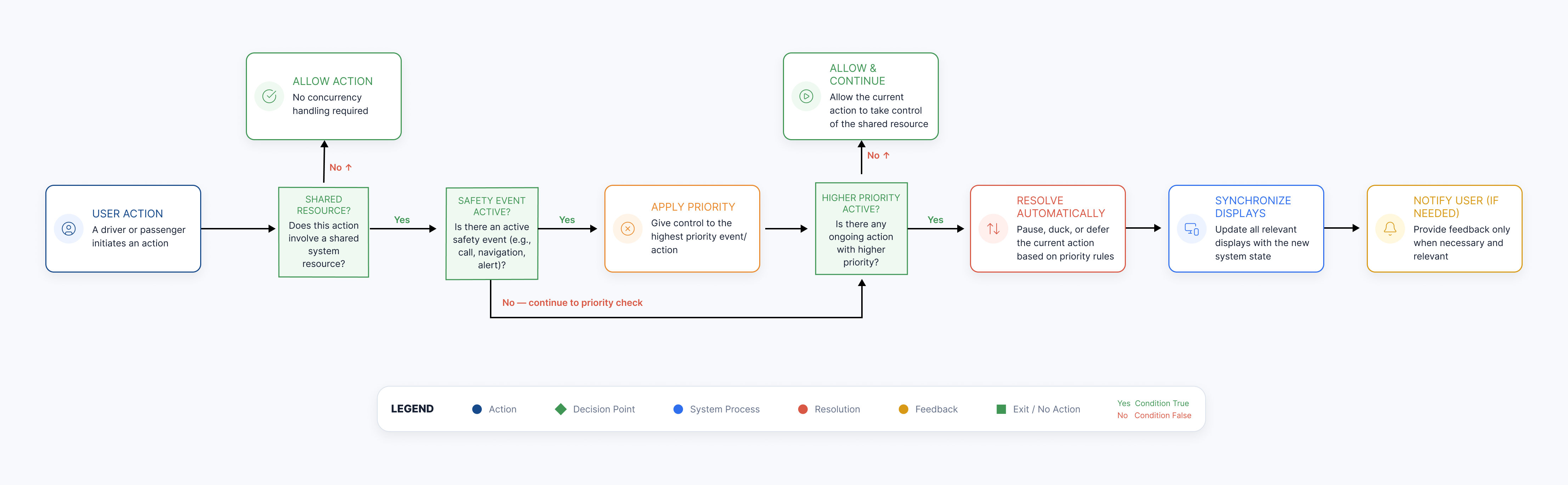
Concurrency Decision Tree
Interaction Flows
Audio concurrency
01 · Start
Passenger or driver starts media
02 · Action
Audio engine assigns active source
03 · Interrupt
Higher-priority event arrives
Priority event
04 · Action
Current media pauses or ducks
05 · End
Displays sync the new state
01 · Start
Passenger or driver starts media
02 · Action
Audio engine assigns active source
03 · Interrupt
Higher-priority event arrives
Priority event
04 · Action
Current media pauses or ducks
05 · End
Displays sync the new state
Latest valid interaction owns the shared speakers until a higher priority interrupts.
Relax Mode transitions
01 · Start
Vehicle is parked
02 · Action
Driver initiates Relax Mode
03 · Action
Ambient themes sync across displays
04 · Interrupt
Vehicle begins moving
Priority event
05 · End
Driver experience exits with clear feedback
01 · Start
Vehicle is parked
02 · Action
Driver initiates Relax Mode
03 · Action
Ambient themes sync across displays
04 · Interrupt
Vehicle begins moving
Priority event
05 · End
Driver experience exits with clear feedback
Immersive cabin experiences only while stationary — and exit safely when motion begins.
Passenger media control
01 · Start
Passenger opens media on PID
02 · Action
Playback starts on shared speakers
03 · Interrupt
Driver call or navigation interrupts
Priority event
04 · Action
Passenger is guided to headphones
05 · End
Media resumes when safe
01 · Start
Passenger opens media on PID
02 · Action
Playback starts on shared speakers
03 · Interrupt
Driver call or navigation interrupts
Priority event
04 · Action
Passenger is guided to headphones
05 · End
Media resumes when safe
Passengers get independence without forcing the driver to manage conflicts.
FOTA update journey
01 · Start
Update available
02 · Decision
System checks vehicle state
03 · Action
Install offered when parked
04 · Interrupt
Deferred automatically while driving
Priority event
05 · End
Completion confirmed after restart
01 · Start
Update available
02 · Decision
System checks vehicle state
03 · Action
Install offered when parked
04 · Interrupt
Deferred automatically while driving
Priority event
05 · End
Completion confirmed after restart
Over-the-air installs never compete with driving attention.
Boot-up sequence
01 · Start
Ignition on
02 · Action
Safety-critical UI loads
03 · Action
Cluster and CID initialize
04 · Action
Passenger display follows
05 · End
Media and apps become available
01 · Start
Ignition on
02 · Action
Safety-critical UI loads
03 · Action
Cluster and CID initialize
04 · Action
Passenger display follows
05 · End
Media and apps become available
Critical systems come up first; entertainment waits for readiness.
Play action priority checks
01 · Start
Passenger presses Play
02 · Action
Audio engine receives command
03 · Decision
Check if driver media is playing
04 · Interrupt
Apply priority rules if needed
Priority event
05 · End
Start playback or prompt headphones
01 · Start
Passenger presses Play
02 · Action
Audio engine receives command
03 · Decision
Check if driver media is playing
04 · Interrupt
Apply priority rules if needed
Priority event
05 · End
Start playback or prompt headphones
Every play request is evaluated against shared resources and safety context.
End-to-end flows documenting decision points across both displays.
Phase 5 Design
Production-ready UI screens
Final cockpit screens spanning call handling, headphone routing, and the Sierra slab display.
UI Screens — Call Handling
Call flows that prioritize driver safety while keeping both displays synchronized and predictable.
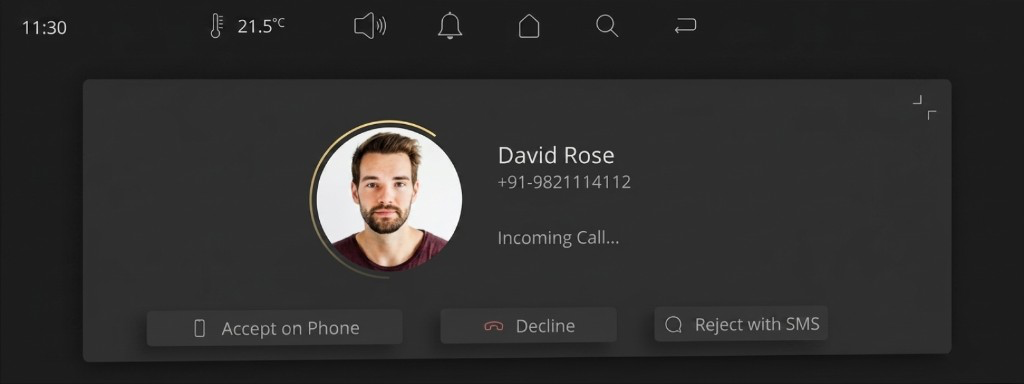
Incoming call — Accept on Phone action
- Prioritizes driver safety with uninterrupted driver communication.
- Adapts contextually based on the active system state.
- Reduces cognitive load through a clear "Accept on Phone" action.
- Ensures a seamless multi-display experience with predictable system behaviour.
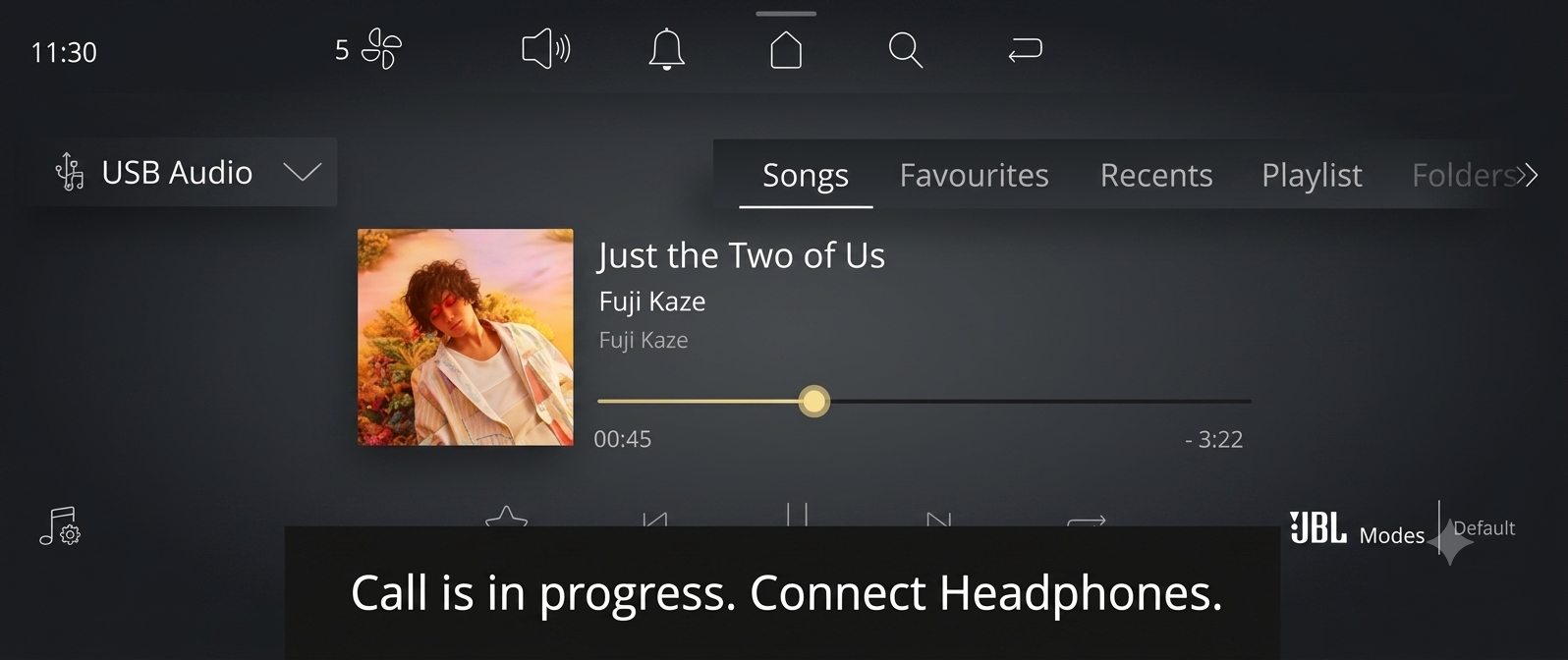
Call in progress — Connect Headphones prompt
- Prioritizes driver calls to ensure safe and uninterrupted communication.
- Pauses passenger media and suggests connecting headphones.
- Communicates system status through a clear contextual message.
- Maintains a seamless, safety-first multi-display experience.
Slab display luxury experience

UI Screens — Headphone Experience
Quick audio switching between car speakers and Bluetooth headphones. Dedicated JBL sound modes for private listening without interrupting the driver.
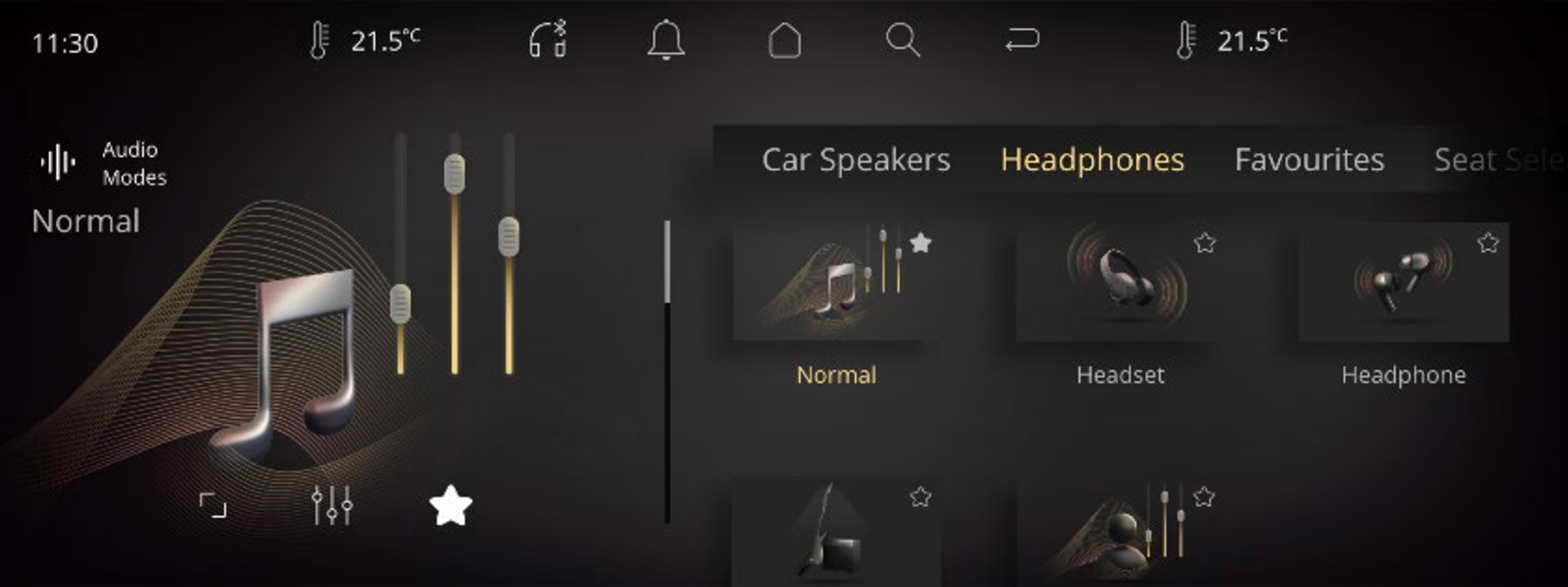
Audio modes for headset & earphones
Other UI Screens
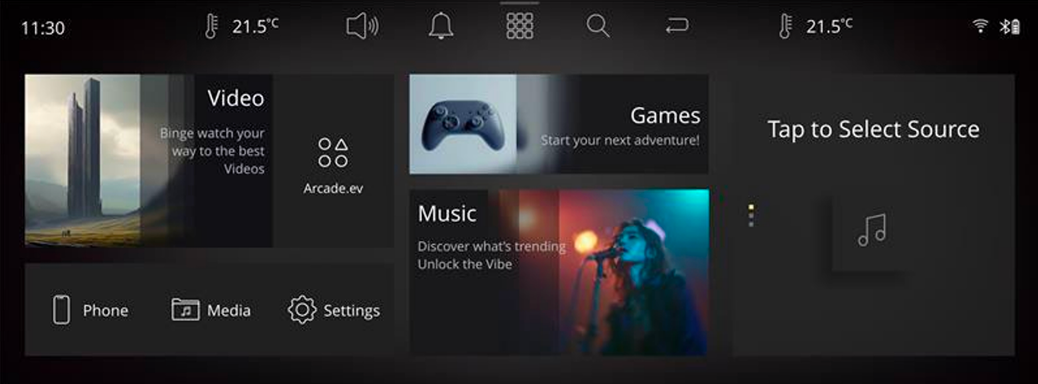
Passenger display home screen
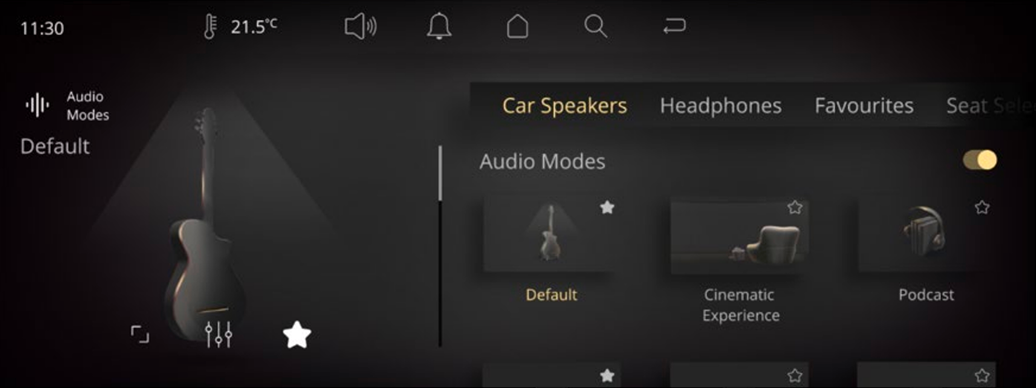
Audio modes
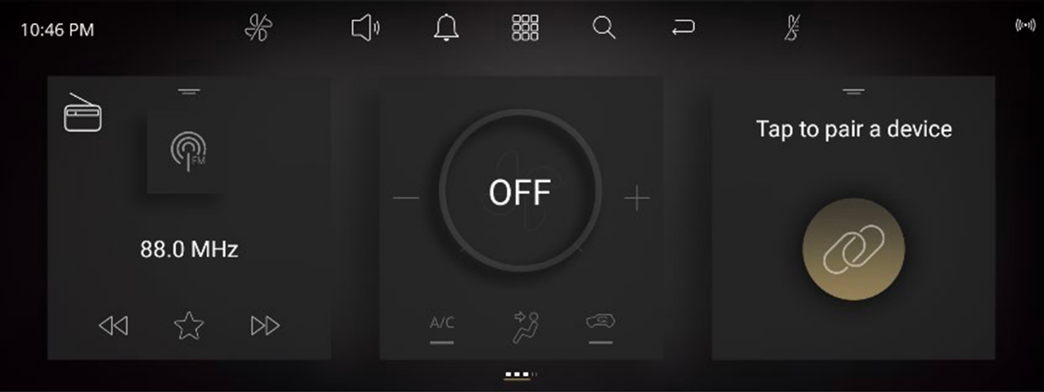
Center infotainment home screen
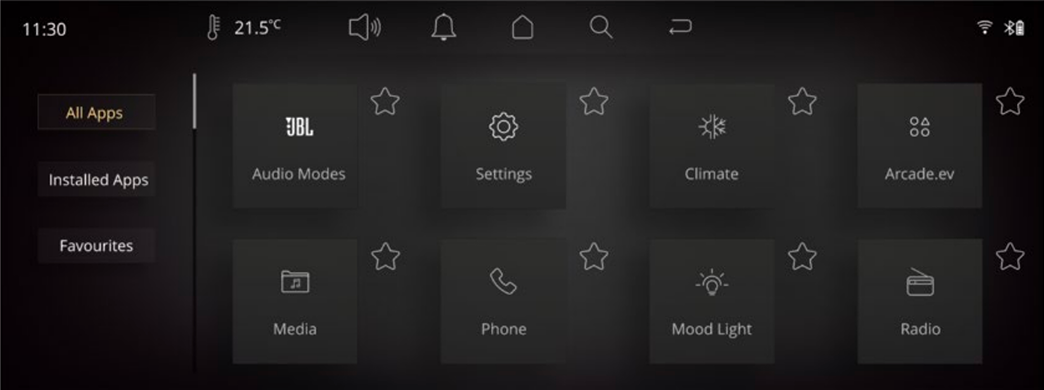
App drawer
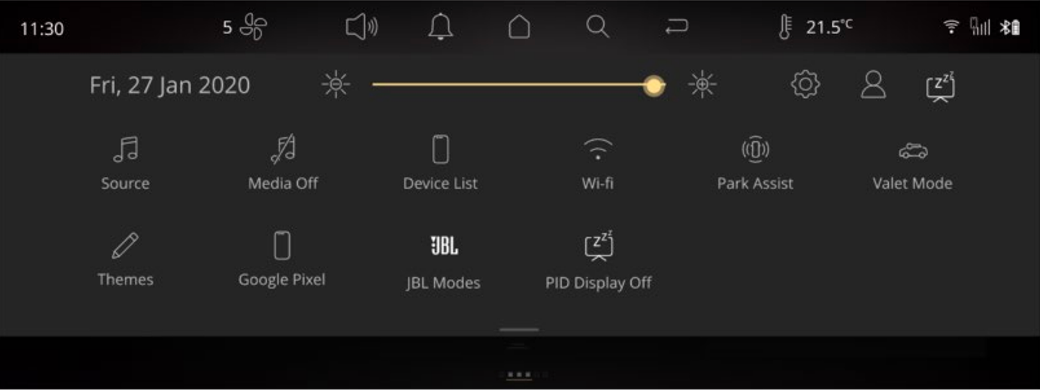
Quick access drawer
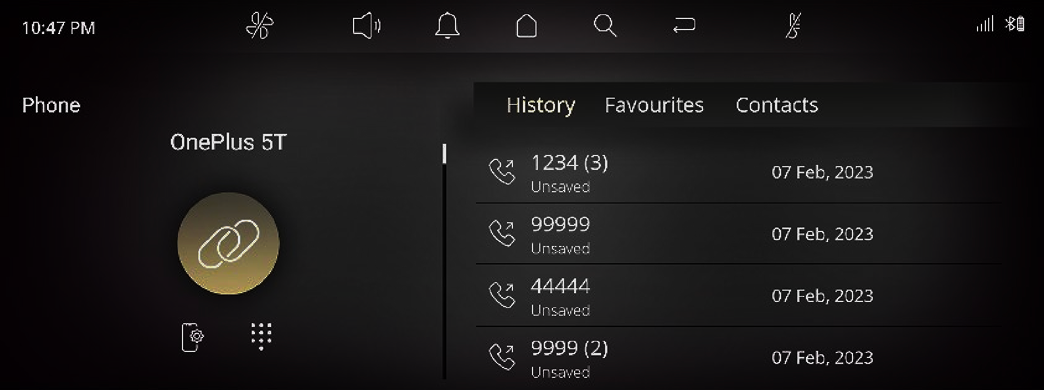
Phone app
Most selling relax mode experience
The Tata Sierra's Relax Mode is a specialized cabin-relaxation feature that orchestrates ambient lighting, climate control, and the infotainment screens to create a peaceful, meditative environment.
- Audio & Visual Themes: It features a 3-audio and visual experience with three distinct theme options: water, fire, and space.
- Integration: The graphics blend across the passenger and infotainment displays, accompanied by relaxing ambient sounds.
- Operation: Because of the multi-screen setup, the relax graphics can run on the co-passenger or passenger display while the driver’s screen and central systems continue handling functions like navigation or reverse camera feeds.
- Usage: It is designed to offer a calming experience during pauses in your journey, such as when you are parked or charging the vehicle.
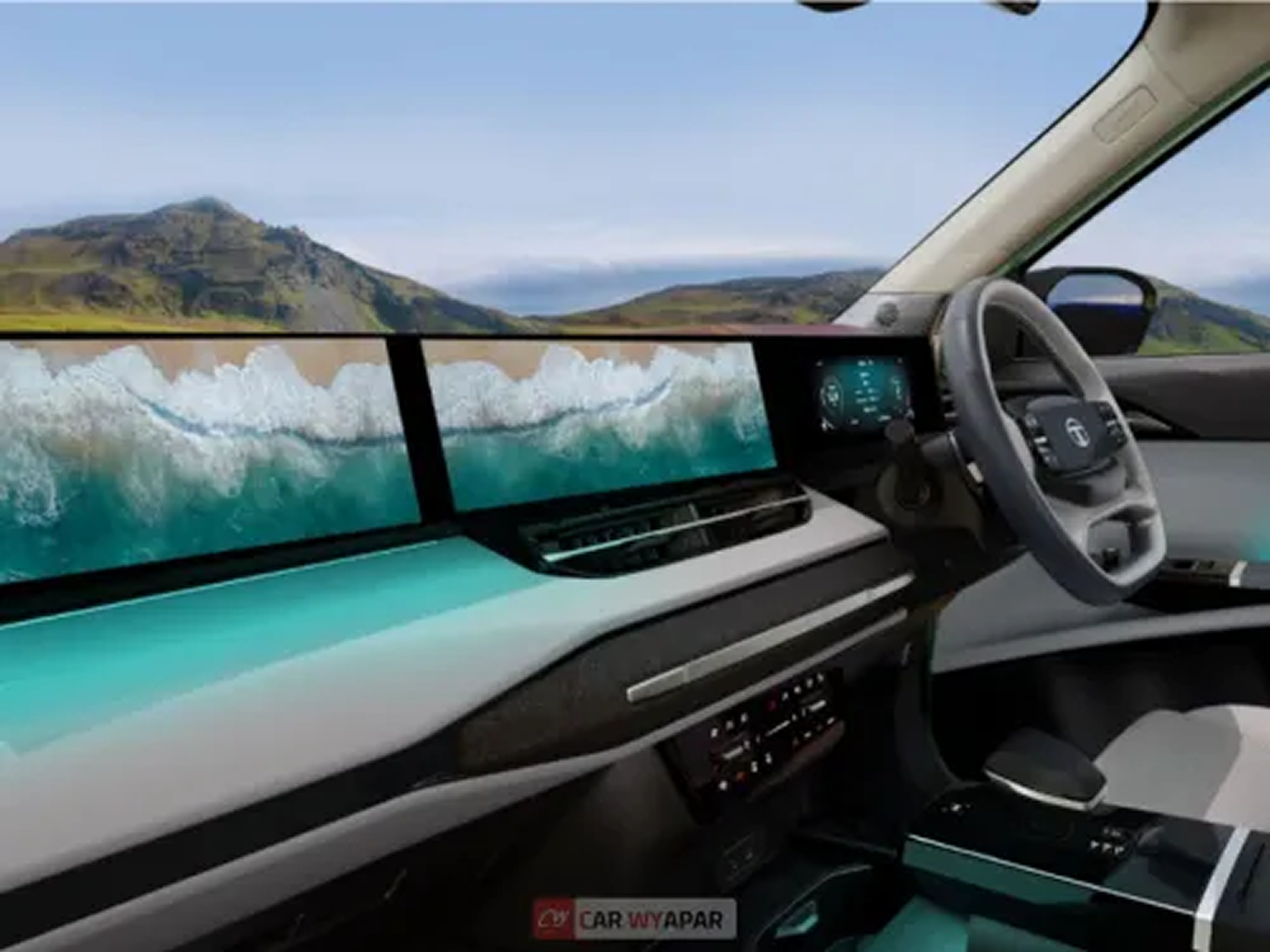

One cockpit, three displays, shared resources
What this project taught me
Systems over screens
The most valuable artifacts weren't UI mockups — they were behaviour matrices, decision trees, and concurrency rules that gave engineering and QA a shared language for edge cases.
Invisible complexity builds trust
Users don't want to manage audio ownership. They want the system to resolve conflicts predictably and explain safety-driven changes only when necessary.
Two displays, one ecosystem
The challenge was never designing a passenger screen — it was designing how two active displays behave as one intelligent system under shared constraints.